


PromptSmart+
4.3313.00 Reviews
App Specs
- Version
- 4.0.3
- Updated On
- License
- Free
- Downloads
- 100,000+
- Developer
- Belleau Technologies LLC
- Categories
- Video Players & Editors
- Platform
- Android
Screenshots
 Analysis by AppCompare
I decide whether a teleprompter is worth using by asking one practical question: does it help me speak naturally, or does operating it become another thing to worry about? PromptSmart+ is built around that distinction. Rather than asking me to keep a finger on the screen to move a script, it uses speech recognition to follow my delivery. That makes it especially appealing when I need to look toward a camera or an audience instead of down at notes.
That approach does come with a trade-off. A voice-following prompter needs to hear the speaker clearly, and it works best when the script and spoken words stay reasonably close. If I expect to improvise heavily, record in a noisy room, or read in a place where speaking aloud is awkward, a simple manual-scrolling prompter may be easier. The right choice depends less on how polished the feature sounds and more on how I actually plan to present.
Choose it for the way you speak
I would consider this app when I have a prepared script and want to deliver it at my own pace. A presenter can pause to breathe or emphasize a point without having to race after fixed-speed scrolling. For a short recording, that can make the difference between reading lines and sounding like I am talking to someone. It is also useful for rehearsing: I can focus on phrasing and eye line instead of repeatedly touching the screen to keep the words moving.
A realistic example is recording a short work update at home. I can prepare the main points as a script, position the device near the camera, and speak through the material while the text follows my voice. If I stop to collect a thought, the prompt can pause with me. I still need to check the camera framing and make sure I can read the text comfortably, but I am not constantly reaching forward to scroll. For a presentation with frequent pauses, that hands-free rhythm is a meaningful convenience rather than a flashy extra.
What speech tracking changes in practice
Voice tracking is most helpful when I treat it as a pacing aid, not as an editor or a guarantee that every take will be perfect. I would read through a script once before recording, smoothing out tongue-twisting phrases and marking natural breaks with clear punctuation. Those small preparations make it easier to keep the spoken delivery aligned with the text. If I rewrite a sentence while speaking, the app may have less to follow, so a loose outline or improvised conversation is not its strongest use case.
One useful workflow is to keep a full script for the opening and any details I cannot afford to forget, then rehearse the transitions aloud before recording. That preserves accuracy without forcing every sentence to sound memorized. Another is to split a long talk into manageable sections before a session; even when a device can display a lengthy document, shorter chunks make it easier to find the right place again after a mistake. These are practical habits, not special app functions, but they help a voice-led prompter feel more dependable.
When a different kind of prompter makes sense
Compared with a conventional manual-scrolling teleprompter, PromptSmart+ can reduce the need to operate the screen while speaking. A manual option may still be preferable when I want a fixed, predictable scroll, when the room is too noisy for speech recognition to track comfortably, or when I am silently reviewing text. A camera recording setup with a dedicated prompting arrangement may also suit someone who needs a particular physical layout, while this app is more compelling for a straightforward phone-based workflow.
Worth Reading Before You Choose

EA SPORTS FC Mobile 26 Is a Bigger Football Game, but It Takes Time

Flipboard Shows What News Apps Must Do Beyond the Feed

Switching to Android Auto Means Rethinking Your Driving Routine

Google Calendar Makes a Crowded Week Easier to Manage

Ludo King Makes the Most of the Minutes Between Plans

Baby Panda World Brings Quick Play to Modern Phones, but Its Game Library Feels Busy
It is also worth separating a teleprompter from a video editor. The app belongs to the video-player and editing category, but its central role is helping me deliver spoken material; I would not choose it as a substitute for tools whose main job is cutting footage, adding effects, or finishing a production. If I mainly want to edit clips, a video editor is the more relevant starting point. If I need to read prepared remarks while keeping my attention near the lens, this is the more focused tool.
Before relying on it for an important take, I would test the actual room, microphone position, and speaking pace I plan to use. A quiet test can reveal whether the device hears me clearly and whether the text is comfortable to follow at the chosen size. If I record beside other people talking or expect to switch between scripted and unscripted sections, I would allow time to recover my place rather than assuming the tracking will behave exactly as it does in a calm rehearsal.
First Impressions and Setup
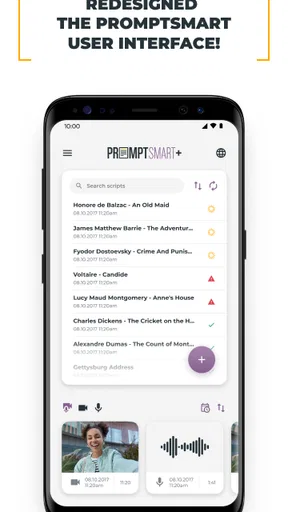
When I first opened PromptSmart+, I was greeted with a clean and intuitive interface. It's not cluttered, which is a huge plus for me. The setup was straightforward, and within minutes, I had my first script loaded and ready to go. The app is designed to be user-friendly, so even if you're not tech-savvy, you should have no problem getting started.
Features That Stand Out
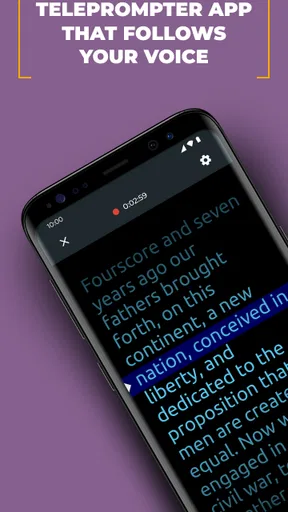
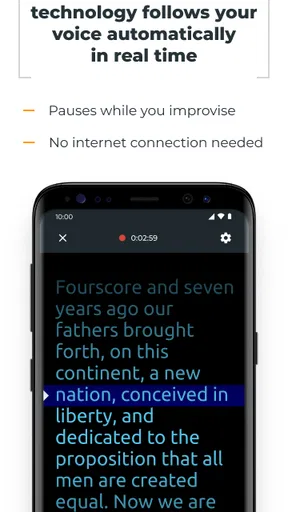
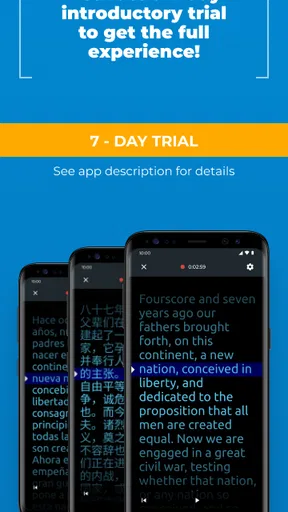
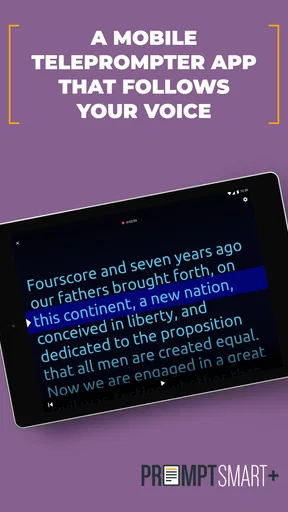
The standout feature of PromptSmart+ is its voice-tracking technology. It uses your voice to automatically scroll the text at your speaking pace. This is a game-changer for anyone who’s had to manually scroll through scripts while trying to maintain eye contact with their audience. I tested it out with a few different scripts, and it worked like a charm. The app accurately follows your speech, pausing when you pause, and picking up when you start again. It's almost like having a personal teleprompter operator.
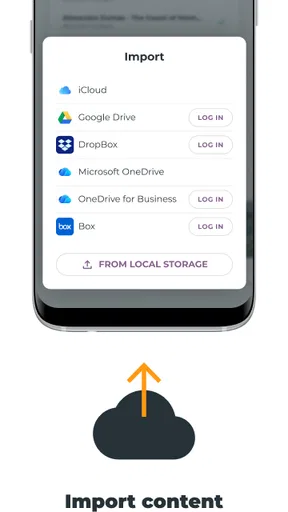
Another feature that caught my eye is the ability to import scripts in various formats. Whether you’ve got a PDF, a Word document, or a simple text file, you can easily bring it into the app. This flexibility means you can work with your preferred document format, saving you the hassle of converting files.
Customization and Usability
Customization is another area where PromptSmart+ excels. You can adjust the font size, background color, and even the scrolling speed, tailoring the experience to your liking. I found the customization options to be robust enough to suit different needs without feeling overwhelming.
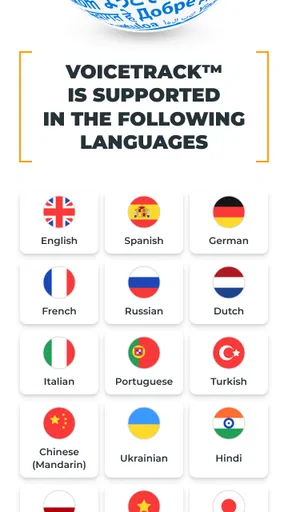
Additionally, the app supports multiple languages, making it versatile for non-English speakers. This is a thoughtful touch, considering the global audience it caters to.
Performance and Reliability
During my testing, PromptSmart+ ran smoothly with no crashes or lags. The voice recognition was spot-on, even in slightly noisy environments, which was impressive. However, like any voice-based technology, it works best in quiet settings.
I also appreciated the offline functionality. You can download and use your scripts without an internet connection, ideal for those unpredictable moments when Wi-Fi is spotty or non-existent.
Who Is It For?
If you're a YouTuber, podcaster, or public speaker, PromptSmart+ could become your new best friend. It's designed to make your life easier by helping you stay on track without sacrificing the natural flow of your presentation. Students and teachers might also find it useful for lectures and presentations.
Even if you just want to practice speeches or improve your public speaking skills, this app provides an excellent platform to do so.
Cost, compatibility, and commitment
PromptSmart+ is a free app from Belleau Technologies LLC, and it has a 4.5 average from around two thousand ratings. It has passed one hundred thousand installs, which suggests that it has found a real audience among people who need a speaking prompt rather than a general-purpose editing suite. The age rating is Everyone, and the app first appeared on February 12, 2018; its current version is 3.6.1, with operating-system support starting at version 9.
Free to install does not mean every possible use is necessarily free: in-app purchases range from $1.99 to $59.99 per item. I would check what is included in the version I plan to use before building a regular recording routine around it. The key decision is whether voice-following saves me enough effort to justify any paid option I choose. If I only need to rehearse a brief speech occasionally, I would start with the free experience and avoid paying for capabilities I may never use.
Switching from handwritten notes or a basic notes app has a small learning cost. I need to prepare readable scripts, place the screen where I can glance at it without obviously looking away, and get comfortable speaking at a pace the recognition can follow. I would not make the first test a live talk or a one-time recording. A low-stakes rehearsal gives me a chance to adjust text size, punctuation, and device position before the delivery matters.
Who should choose it—and who should pass
I would recommend it to people who regularly record scripted videos, deliver prepared talks, teach from planned material, or practice speeches and want a hands-free way to move through text. It is particularly useful when looking down to scroll breaks eye contact or makes a camera performance feel stiff. The ability to bring in common document types can also help someone who already drafts scripts elsewhere and does not want to rebuild each one from scratch.
I would hesitate if my work is mostly spontaneous, if I cannot speak aloud while preparing, or if my recording environment is consistently noisy. In those situations, a bullet-point outline, a manual prompt, or simply rehearsed notes may be less fussy. People who need a full production editor should also look elsewhere for the editing work itself. PromptSmart+ is most valuable when the bottleneck is delivering prepared words smoothly, not when the problem is creating, cutting, or polishing video.
For students and teachers, the benefit is not limited to reading a finished speech. A presenter can use a prepared sequence to keep key points in order, then pause between sections to explain an idea naturally. I would avoid turning every classroom explanation into a word-for-word script, though: the prompt is a safety net for structure and exact wording, while the audience still benefits from eye contact and room to respond.
Final Thoughts
Overall, PromptSmart+ is a solid app that delivers on its promises. Its user-friendly interface, reliable voice-tracking technology, and customization options make it a standout choice for anyone needing a teleprompter. While it may not be perfect—occasional background noise can still trip it up a bit—it's a highly effective tool for most scenarios.
So, if you’re on the lookout for a way to enhance your presentations or videos, give PromptSmart+ a shot. It might just be the game-changer you’ve been searching for.
Pros
- Real-time voice tracking is highly accurate.
- Supports various document formats easily.
- User-friendly interface for quick navigation.
- Offline mode available for on-the-go use.
- Customizable settings enhance user experience.
Cons
- Limited free version features.
- Occasional lag on older devices.
- Subscription model may deter casual users.
- No integration with certain cloud services.
- Requires microphone access for full functionality.
FAQs for PromptSmart+
What is PromptSmart+ and how does it work?
PromptSmart+ is a teleprompter app designed to help speakers, content creators, and presenters deliver their scripts seamlessly. It uses voice recognition technology to automatically scroll the text as you speak. This feature ensures that you stay on track without needing to manually adjust the script, offering a smoother presentation experience.
Is PromptSmart+ available on both Android and iOS platforms?
Yes, PromptSmart+ is available for download on both Android and iOS devices. This cross-platform availability ensures that users can access the app regardless of their preferred mobile operating system, making it a versatile tool for a wide range of devices.
Does PromptSmart+ require an internet connection to function?
PromptSmart+ primarily operates offline, which is ideal for users presenting in locations with limited or no internet access. However, certain features, such as cloud storage synchronization, may require an internet connection to update and back up your scripts.
Are there customization options available within the app?
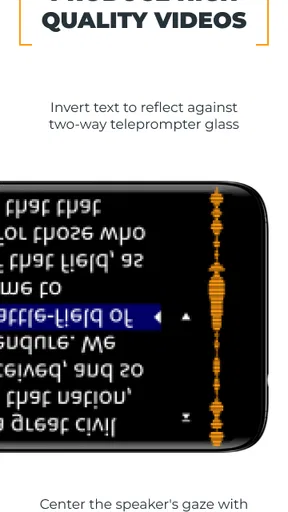
PromptSmart+ offers a variety of customization options to enhance user experience. You can adjust text size, scrolling speed, and mirror text for different presentation needs. These features allow users to personalize their teleprompter setup to suit their specific preferences and presentation style.
Is there a cost associated with using PromptSmart+?
PromptSmart+ may offer both free and premium versions. The free version includes basic features, while the premium version unlocks advanced functionalities like cloud integration and enhanced voice tracking. Users should review the pricing details on the app stores to choose the version that best suits their needs.


